
Budget
A monthly budget that tells you what is safe to spend, pays off the card on a plan, and sees the months ahead.
One payment, yours to keep. Tax is added at checkout where it applies.
Or all 5 paid extensions for $59.
Nothing opened? Install Mecmua first, then try again.
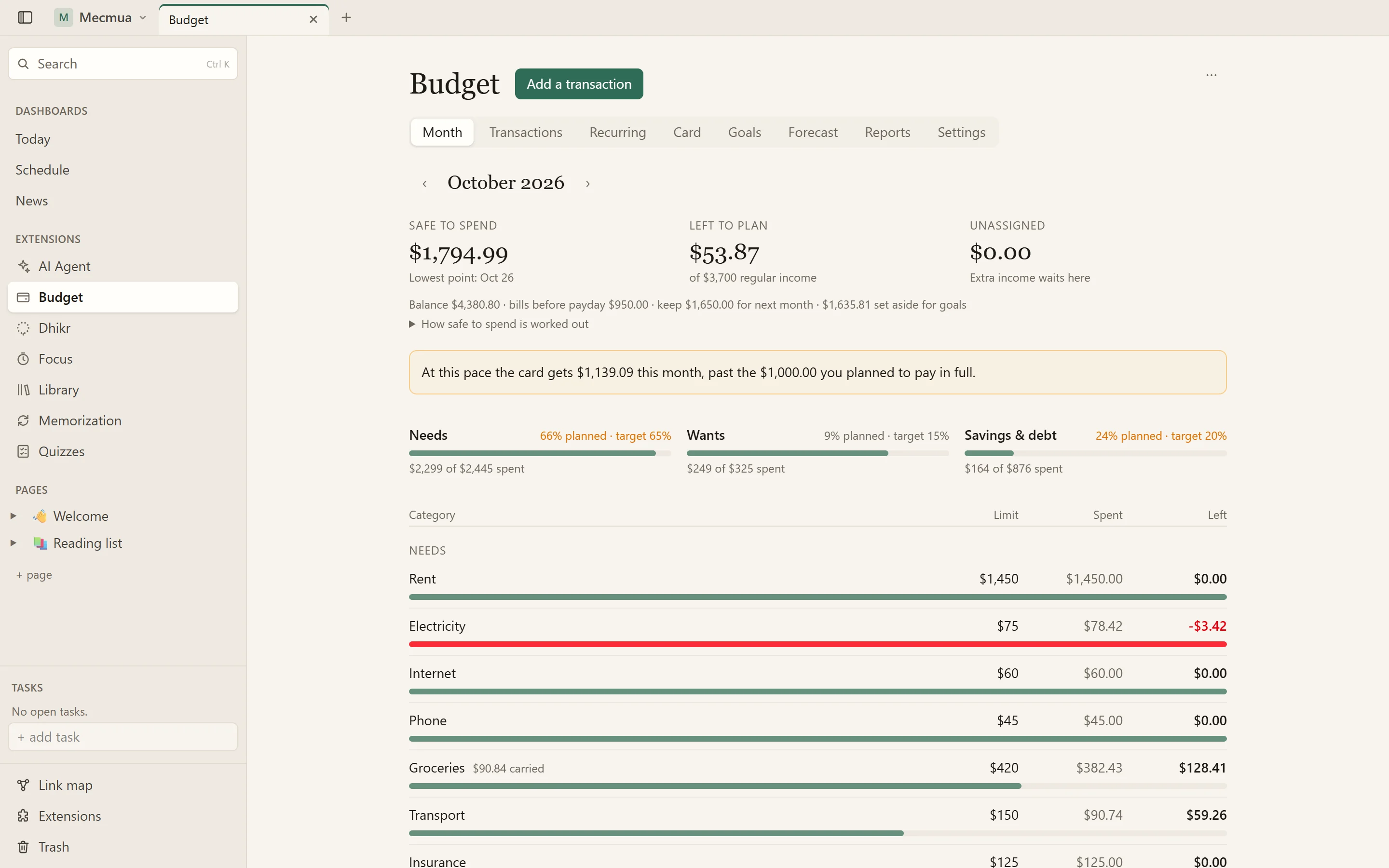
The month: safe to spend, what is left to plan, the three buckets, and every category against its limit
A monthly budget for one household, kept in Mecmua on your own computer. It answers the questions a budget is for: how much can I spend before payday without coming up short, is this month on plan, when will the card be paid off, and where will I be in six months. No bank login, no account, nothing synced to anyone's server.
The month at a glance
The Month tab opens on three numbers. Safe to spend is your main account's balance, less the bills due before your next payday, less what next month needs before the money comes in, less what your goals keep in that account: the lowest your balance will reach, shown with the day it gets there. Left to plan is your regular income less every category's limit. Unassigned is extra income you have not shared out yet.
Below them, your needs, wants and savings buckets against the targets you chose (50/30/20 to start, any split you like), then every category with its limit, what is spent and what is left. A category that rolls over carries what is left, or what was overspent, into the next month. A month can have its own limit for a category without changing the usual one.
Recurring bills and pay
Rent, the phone, insurance, subscriptions, a pay that comes every two weeks or twice a month, a bill once a year. Each makes a pending entry on its day; you confirm it on the Month tab, with the real amount when it differs, as an electricity bill does. Bills can move to the working day before or after a weekend. With bi-weekly pay, the plan counts two paychecks a month and tells you which months bring a third.
Paying off a credit card
Tell it what the card owes, its rate and its due day, then choose a payment a month or the month you want to be clear by: it works out the other, the interest you will pay on the way, and how much sooner $50, $100 or $200 more a month would get you there. Set an allowance for new spending that you pay in full each month. A payment first covers what went on the card that month, and only the rest counts against the old debt, so the progress bar never flatters you. You are warned when this month's spending, or its pace, passes the allowance, and when a month ends above the plan. Enter a statement and its minimum, and reminders come before it is due.
Goals and extra income
An emergency fund, something to buy by a date, an annual bill you save toward month by month. Each goal shows what is saved, the monthly amount, and the month it is reached at that pace, or what a month would need to get there in time. Goals can be kept in a savings account or in your main one, where their money is taken out of safe to spend.
Income that is not your regular pay (tutoring, a side job, a gift) is never planned on. When it comes, it is shared out by your usual split: so much to the card, so much to the emergency fund, so much to sadaqa.
The months ahead
The Forecast runs 3, 6 or 12 months forward: your main account at each month's end, what each card owes, and when it is debt-free. It assumes the plan is kept; extra income is drawn as a band above it, never counted on. Open any month to see what makes it up.
What if scenarios sit beside the plan: a raise from January, a new monthly cost, a one-off purchase, a bigger card payment, a bill that stops, a category's limit changed. Turn one on and see how the end of the year moves.
Import from any bank
Download your account's history as a CSV file and drop it in. The columns are worked out for you: the separator, the header row (even below a block of account details), the date order, the decimal mark, and whether amounts are one signed column, money out and money in, or an amount with a type. What you choose is remembered for that account.
Every line is shown before anything is saved. Lines already in the budget are found and left out, a pending recurring entry is confirmed by the matching line, and a card payment from your chequing file is matched with the same payment in the card's file. Payee rules name and file a line by what its description contains ("FRESH MKT" is Groceries). An import can be taken back afterwards. The file is read on your computer and only the lines you import are kept.
Everyday use
- Quick-add from any program with a shortcut (Ctrl+Alt+B to start, change it in Settings), or Ctrl+Shift+B inside Mecmua, or Add a transaction in the / menu
- Expenses, income and transfers between your accounts; split one purchase over several categories
- Chequing, savings, credit card and cash accounts, in any currency
- Reports: the year by category or by bucket, the monthly trend of income, spending and what you kept, and plan against actual
- A dashboard widget: safe to spend until payday, what is left this month, the next bills and the card
- Reminders as system notifications: days before a card payment (3 to start) and before an annual bill (30, 15 and 2)
- Blur greys out every amount when someone can see your screen
- Export the whole budget to a file, and restore it
Good to know
Reminders and the shortcut from any program need the Mecmua desktop app, version 1.4 or later. Budget is in English and Turkish.
At a glance
- Safe to spend until payday: your balance, less the bills due before then, what next month needs and what your goals hold
- Categories in needs, wants and savings buckets, with limits you set, targets you choose and rollover per category
- Recurring bills and pay, weekly to yearly, that wait as pending entries until you confirm the real amount
- A credit card payoff plan, by a monthly payment or a month to be clear by, with the interest on the way and a warning when new spending adds to the debt
- Goals: an emergency fund, something to buy, an annual bill; extra income shared out by your own split
- A forecast up to twelve months ahead, with what-if scenarios side by side
- CSV import from any bank: columns worked out for you, duplicates caught, payee rules, an undo
- Quick-add from any program, reminders before card payments and annual bills, a dashboard widget, any currency
What changed
- 1.0.0October 23, 2026
- First release.